Subscriber Experience

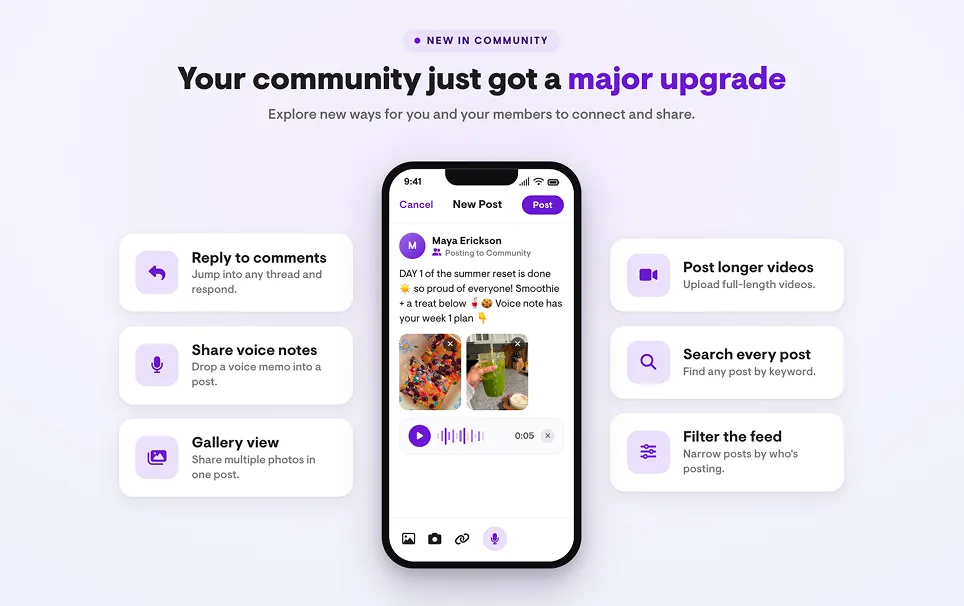
Community just got a major upgrade!

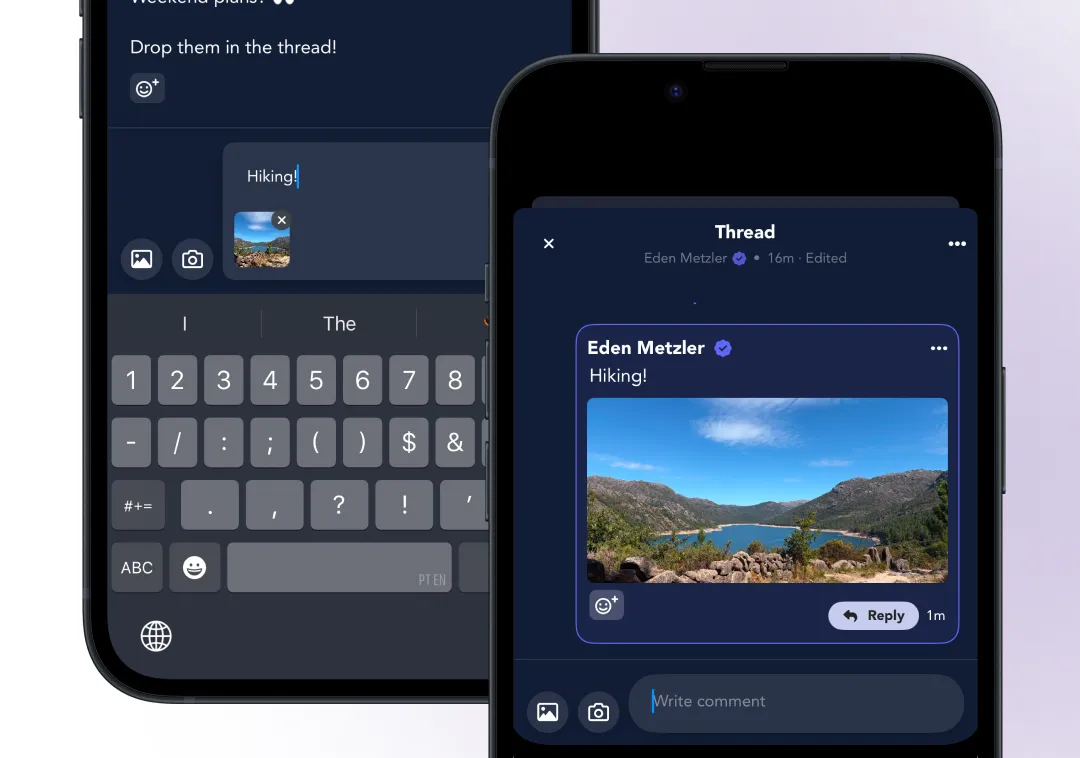
Your community is the social layer that ties you to your subscribers day to day, and this release makes posting richer and conversations easier to follow.

  • Longer videos. Upload or record long video clips right in a post. The old file-size limit is gone, so community videos now work the same way as exercise videos.
  • Audio recordings. Record voice notes directly in the app and share them alongside text, photos, or video.
  • Threaded replies. Reply to a specific comment so responses stay attached to what they answer, instead of piling up at the bottom of the post.
  • Filters. Subscribers can filter the feed by all posts, coach-only, or their own. The coach-only filter is a cleaner way to surface key announcements than pinning.
  • Search. Search the community by topic to resurface a past announcement, a popular thread, or a question you already answered, whether it’s yours or a subscriber’s.
  • More emoji reactions. A wider set of emoji reactions to react with on any post or comment.
  • Gallery view. Multiple images in a single post now group into a gallery.
  • Cleaner admin view. Moderate everything from one place in the Community tab of your dashboard: reported content, blocked users, and pinned announcements in a single spot.
A community post being composed in the Playbook app, with voice note, gallery, and video options
Creator Experience

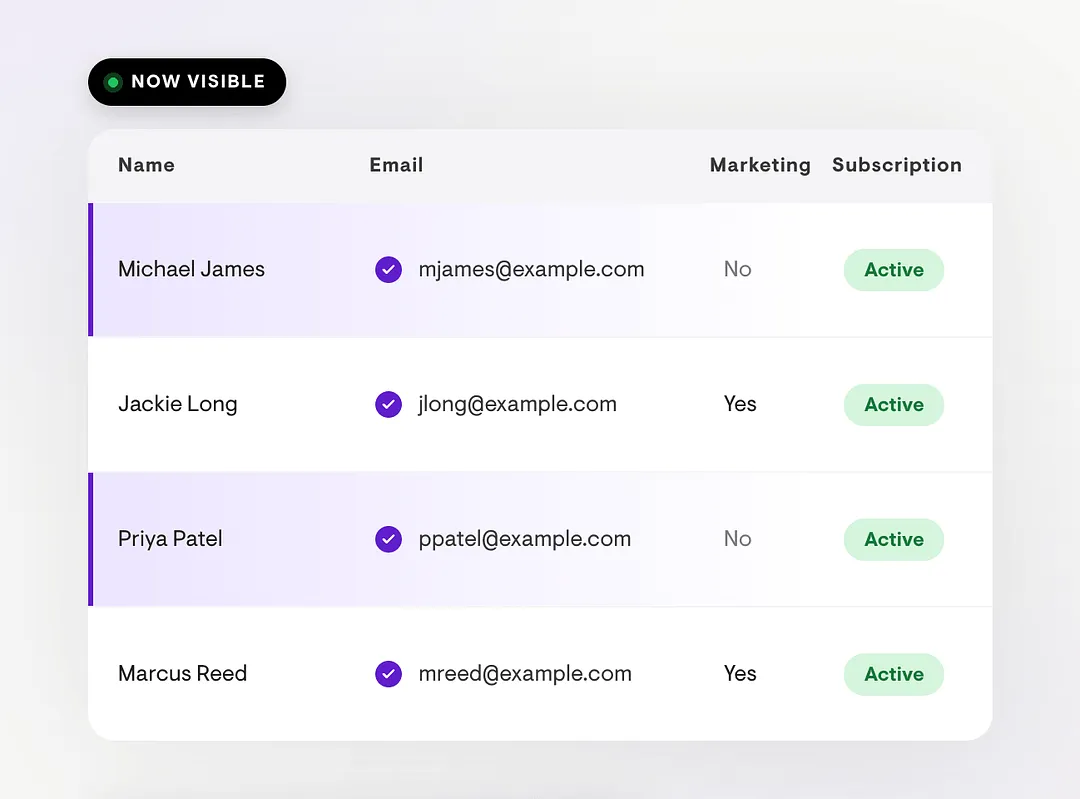
See every subscriber's email on your Audience page

Contact information is no longer blurred for any of your subscribers, so you can look people up and help them faster.

  • No more blurred contacts. Emails that used to be hidden for anyone opted out of marketing are now fully visible.
  • Resolve issues quicker. Look up a subscriber by email to help with questions that come in through DMs or your community.
  • Opt-outs are still respected. The Marketing column stays on the Audience tab, and both CSV exports and webhooks honor it, so there’s no risk of marketing to someone who opted out.
The Audience page in Playbook showing member names and email addresses fully visible
Creator Experience

Turn Followers Into Customers With Free Offers

Share content for $0 so people can try you before they buy, then track them all the way to paid.

  • Unlock with just an email. Users get access with no credit card. A Playbook account is created or matched on the spot.
  • New members auto-follow you. Everyone who claims an offer starts following your account, so your content reaches them going forward.
  • Choose exactly what’s included. Bundle programs, community access, and Extras like PDFs into the offer.
  • In-app claims are tracked. Existing users see a “Free” badge and tap to claim, which keeps your audience and analytics data clean.
  • Follow the full funnel. See who claimed and who converted from free to paid in your Audience and Analytics tabs.
  • Edit anytime. Because the offer is free, you can change what’s included after publishing.
Creator Experience

Exclusive Subscriptions

Launch your own subscription straight from the Offers tab, with full control over pricing, access, and how new members join, and no disruption to your current subscribers.

  • Run Platform and Exclusive side by side. Set your own price and offer both at once. Existing subscribers stay grandfathered on Platform while new members check out on Exclusive by default.
  • Differentiate what each plan includes. Toggle Community, Direct Messages, and Livestreaming on or off independently for Platform and Exclusive.
  • Add optional free trials, set independently for monthly and annual, so you can offer a trial on one plan without the other.
  • Give subscribers two ways to switch. They can upgrade to Exclusive with their remaining Platform value prorated across, or keep Platform and add Exclusive on top.
  • Nudge them when you’re ready. Send up to two push notifications encouraging subscribers to move to Exclusive.
  • Change pricing whenever you want. Update monthly or annual prices anytime from the Offers page. New pricing applies only to new subscribers, so start low to build momentum and raise it as you add value.

Help articles:

Creator Experience

Offer Builder

Package and sell anything on Playbook from one place, then price and present it however you like.

  • Bundle multiple products into one checkout page, including one-time programs, subscription programs converted to one-time purchases, and Extras like PDFs, guides, and videos.
  • Paywall your Extras. Toggle a paywall on any PDF, slide deck, video, or link to make it a purchasable item or add it to a bundle.
  • Build a free lead magnet. Create a freebie in Extras, add it to an offer, and discount it to $0 to drive sign-ups.
Creator Experience

Video templates

Share long-form video in your Extras tab, separate from your workout content.

  • Upload standalone videos that live in Extras, kept apart from your workout and exercise library.
  • Full-width playback on any device, so portrait or landscape both look right.
  • Up to 10 minutes per video, with a custom banner image or the default text style.
  • Likes and comments built in. Comments are on by default and can be toggled off, and you can hide or unhide individual comments to moderate.
Creator Experience

Extras tab

Give your audience value beyond workouts with a dedicated content tab on your channel.

  • Add external links that open in the browser with no paywall, ideal for social profiles, affiliate shops, or a LinkTree-style hub.
  • Upload PDFs like meal plans, guides, and trackers, gated behind a subscription or purchase.
  • Create swipeable Slides from images for day-by-day guides or challenge instructions, also gated.
  • Manage it your way. Turn the tab on or off, reorder items by drag and drop, and rename the tab to match your brand.
Creator Experience

Running template

Program running into any workout, or build a session that’s all running.

  • Add running as an exercise in any workout, or make a run-only workout, and combine it with circuits, autoplay, or other exercises.
  • Choose Outdoor or Treadmill. Outdoor runs can be time-based or distance-based; treadmill runs let you set time, speed, and incline.
  • Coach with audio cues on outdoor runs, uploaded from desktop or recorded in the mobile app.
  • Clear tracking for users, who see every segment with total and individual durations and can start, pause, and resume in the app.